
Docs
Pixel Flow user manual and best practices
Find scanning, filtering, image details, library, export, account, and industry workflow guidance by task.
Responsible Use of Pixel Flow: Organize Clues First, Confirm Rights Separately
Pixel Flow can help you scan webpage images, filter candidate assets, view image details, save items to a library, download files, export source records, and manage download history. But it is an image asset management and source-clue organization tool. It does not have the ability to grant authorization.
In other words, installing the extension, signing in, upgrading to PRO, downloading an image, exporting an Excel file, running AI fingerprint detection, or seeing a source field in Pixel Flow does not give you copyright, commercial usage rights, publishing rights, training-data rights, redistribution rights, or permission to bypass the source website’s rules.
If you plan to use an image for public publishing, client delivery, advertising, ecommerce listings, model training, dataset distribution, or resale, treat the clues generated by Pixel Flow as review materials. Then make the final decision together with the source website terms, stock-library license, client authorization, author authorization, portrait rights, trademark rules, and the requirements that apply in your region.
Separate Clues, Evidence, and Authorization
The source page, image URL, page title, image description, image dimensions, file format, capture time, download time, image tags, metadata, AI fingerprint result, and AIGC parameters you see in Pixel Flow are all organized clues. They help you trace questions such as “where did this image come from,” “what was the page context at the time,” and “what technical information can still be read from the file.”
Authorization answers a different question: why are you allowed to use this image in this way? Authorization usually comes from source website terms, stock-library licenses, author permission, client-provided files, contracts, platform rules, open-source licenses, brand asset guidelines, or other verifiable proof.
A responsible workflow should therefore keep at least two kinds of materials:
| Material type | Main question it answers | What Pixel Flow can do |
|---|---|---|
| Source clues | Where the image came from, when it was collected, and what readable information was available | Capture, save, download, export, record, and help with later review |
| Authorization materials | Whether you may copy, modify, publish, use commercially, train on, or distribute the image | Pixel Flow cannot grant this or make the final decision for you |
If you only keep the image file without source clues, it becomes hard to trace later. If you only keep source clues without authorization materials, you still cannot treat the image as cleared for commercial use, public publishing, or model training.
Where Pixel Flow Fits in a Responsible Workflow
From a user’s perspective, Pixel Flow is better suited for discovery, organization, record keeping, and preparation before review. It is not an authorization approval tool.
You can use it this way:
- Open a page you are allowed to access, and review the images already displayed on the current page.
- Use filters such as format, aspect ratio, source type, and size category to narrow the visible image set, so you can more quickly find images to preview, favorite, download, or export.
- Open image details to inspect dimensions, format, source page, image URL, readable metadata, and AI-generation clues.
- Save images that need later review to the library, and use image tags to classify them and mark project, purpose, or review status.
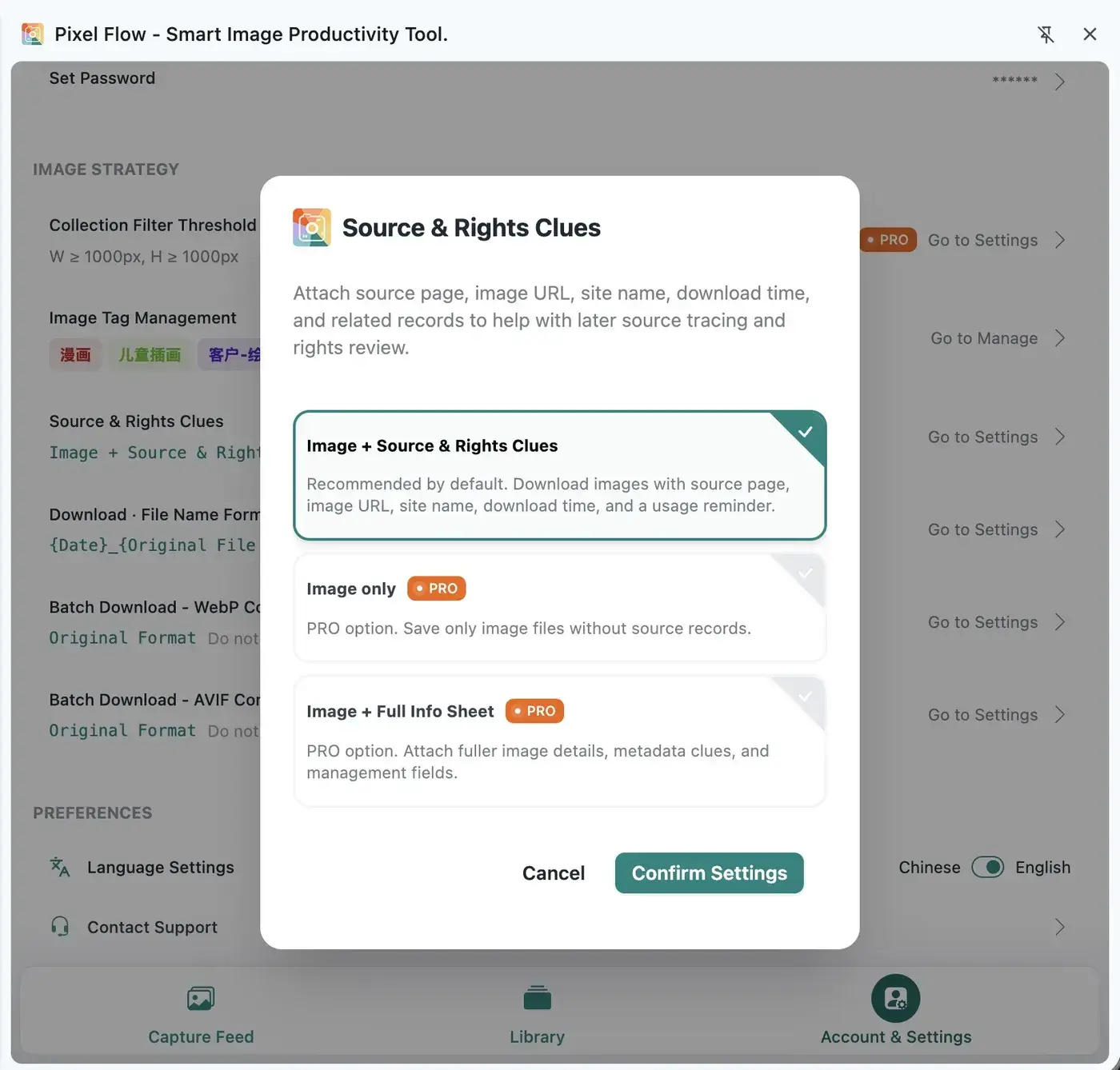
- Keep Source and Rights Clue Records when downloading, or export Excel files for team review.
- Before public use, have the responsible person confirm whether the image can be used according to source terms, authorization files, and project purpose.
Do not treat Pixel Flow as an automated content-copying tool. Also do not interpret “can be scanned,” “can be downloaded,” “can be exported,” or “can be reverse-searched” as “can be used freely.”

How to Use Each Feature Responsibly
| Feature | Good use | Do not interpret it as |
|---|---|---|
| Capture feed | Review images already displayed on the current page, and filter out tiny images, icons, and noise | Being able to capture an image means the source website allows copying or reuse |
| Library | Save candidate assets, inspiration references, owned materials, or images waiting for review | Favoriting an image means you obtained copyright |
| Image tags | Mark project, client, purpose, and status, such as “authorization pending,” “internal reference,” or “archived” | Tags can replace contracts, permission emails, or stock-library licenses |
| Image details | Inspect dimensions, format, source page, metadata, AI-generation clues, and operation footprint | Technical information alone proves authorship or license scope |
| Download | Save images you have decided to process, while keeping download records | A successful download means the image can be published, used commercially, or used for model training |
| Excel export | Create a handoff-ready, reviewable, traceable image inventory | Excel is an authorization letter or legal opinion |
| Google Reverse Image Search | Look for similar images, public appearances, and possible original sources | Similar search results confirm the true rights holder |
| Backup and migration | Move local library data, tags, download history, and settings | Images in a backup package are free from their original source and authorization limits |
Read Technical Clues Carefully
Some image-detail fields come from the image file itself or from webpage context, such as camera settings, GPS, editing software, copyright declaration fields, AI-generation clues, AIGC parameters, source pages, and image URLs. These details can help you make an initial judgment about source, technical characteristics, and review priority, but they cannot alone serve as a final conclusion about an image’s true origin, author identity, copyright ownership, or authorized usage scope.
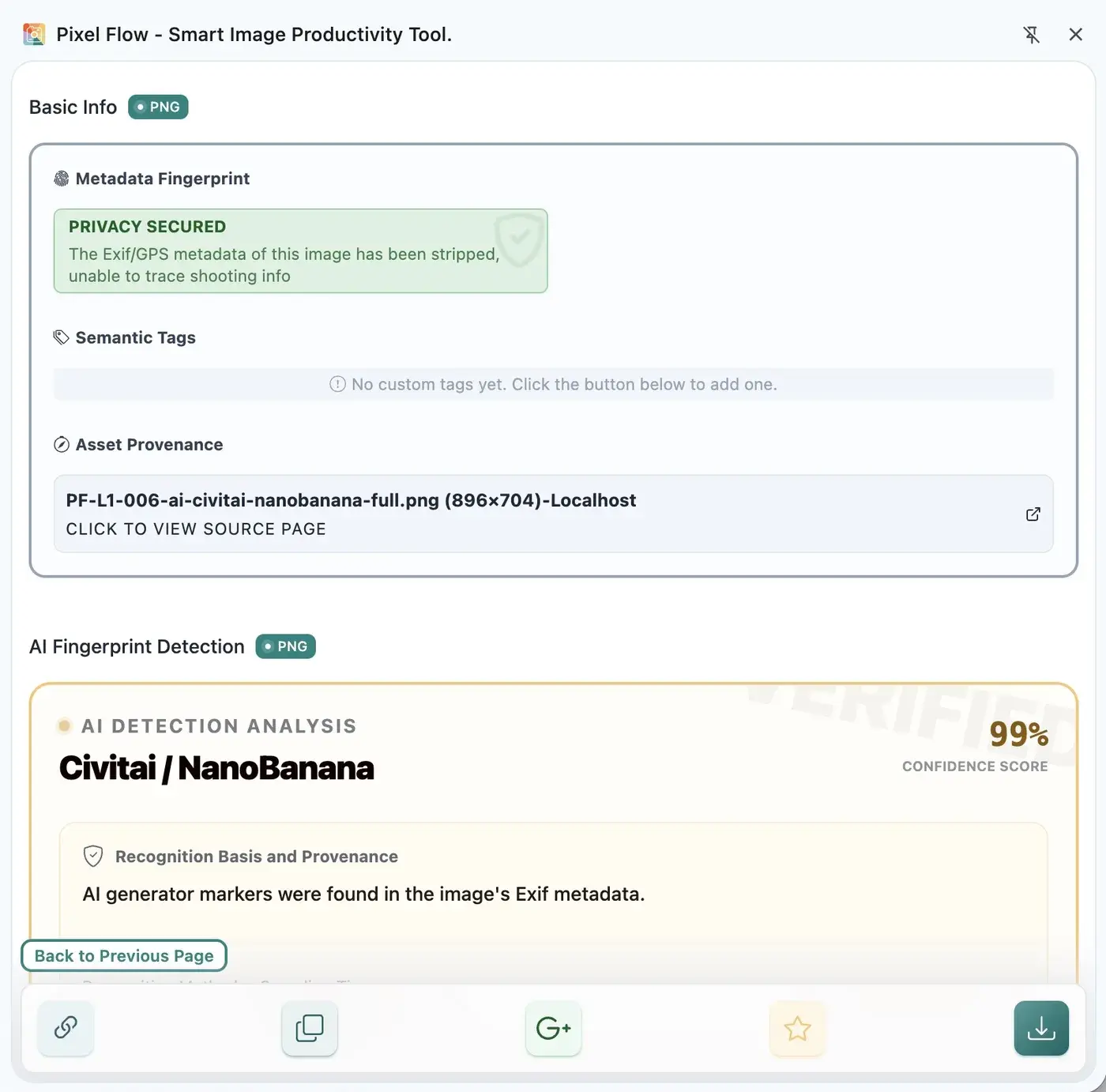
This part is technical, and you do not need to understand every standard item by item. The important point is: image details shown by Pixel Flow are not invented from nothing. They are usually parsed from image-file metadata and webpage context according to public technical specifications.
- Exif information: often records image metadata such as camera, capture time, aperture, shutter speed, focal length, and GPS. See the CIPA standards list.
- XMP / IPTC information: often records metadata such as creator, description, copyright statement, and editing tools. See the Adobe XMP specifications and IPTC Photo Metadata Standard.
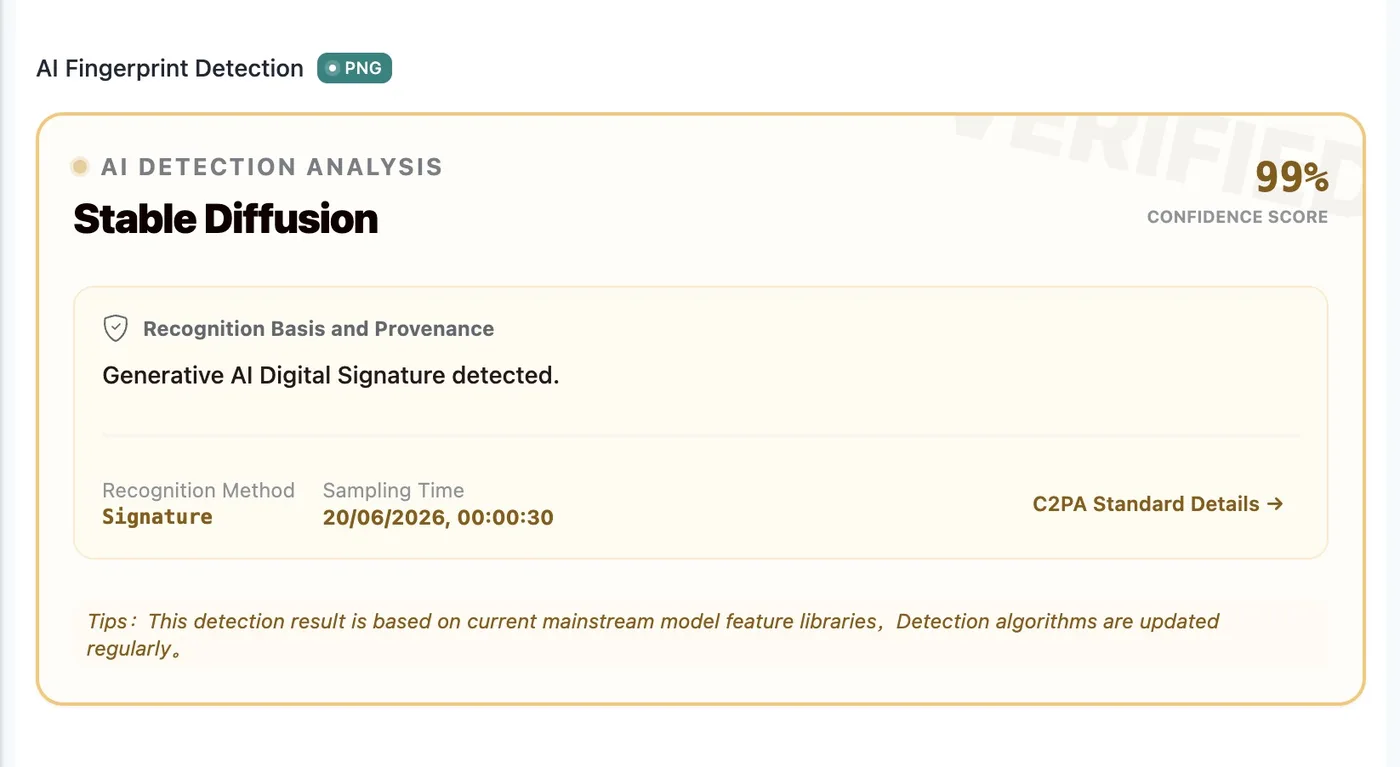
- C2PA-related clues: support technical provenance for content source and modification history. See the C2PA Specifications.
- AI fingerprint detection and AIGC parameters: indicate whether an image may contain traces of generative AI tools, generation parameters, or export tools.
If the source website, image service, social platform, or CDN has cleared, rewritten, compressed, or transcoded these data, Pixel Flow will not create missing data out of thin air. It can only show clues that are still readable from the current file and current page.
Web images are often recompressed, cropped, transcoded, and cached during publishing, distribution, and display. To reduce transfer costs, protect user privacy, keep image specifications consistent, or maintain business control over asset distribution, platforms may also actively remove, rewrite, or keep only part of the metadata.
So when you see data parsed by Pixel Flow, keep three limits in mind:
- Reading a field only means that the current file contains that record. It does not directly prove true source, author identity, or license scope.
- Not reading a field does not mean the image has no source, no copyright, no editing history, or definitely was not generated by AI.
- Metadata, AI fingerprints, AIGC parameters, and source URLs should all be treated as review clues. They cannot replace contracts, license terms, rights-holder confirmation, or professional legal advice.
When Pixel Flow Is a Good Fit
From a responsible-use perspective, Pixel Flow is most suitable for image organization, source record keeping, and review preparation scenarios such as:
- You are organizing images from your own website, client-provided files, or internal materials your team is allowed to process.
- You are doing design inspiration research for internal learning, comparison, and archiving, without directly publishing third-party images.
- You are preparing an image inventory before client delivery so the responsible person can confirm authorization item by item.
- You are checking page image dimensions, formats, animation frames, color space, or readable metadata.
- You want to preserve source pages, image URLs, download time, and tags, so image context is not lost after it leaves the webpage.
What these scenarios have in common: you treat Pixel Flow as an asset management and review-preparation tool, not as an authorization tool.
When Pixel Flow Requires Extra Caution
If you plan to use Pixel Flow in the following scenarios, pause first and confirm the boundaries for access, processing, and reuse:
- Images come from logged-in pages, member pages, paid stock libraries, paid courses, internal systems, or client dashboards.
- The source website explicitly restricts downloading, copying, scraping, commercial use, redistribution, or model training.
- Images contain portraits, children, medical information, identity information, location information, license plates, orders, chat records, or other private content.
- Images contain brand trademarks, packaging, posters, film or TV stills, artworks, illustrations, fonts, UI designs, or third-party product images.
- You plan to use the images for advertising, ecommerce listings, social publishing, client delivery, print, datasets, model training, or resale.
If you are not sure, put the image under a tag such as “authorization pending” and do not publish or deliver it yet.
What Pixel Flow Should Not Be Used For
Do not use Pixel Flow to:
- Bypass login, payment, access control, or website restrictions to save images.
- Bulk-copy third-party stock libraries, social media, product pages, or user-generated content.
- Treat Source and Rights Clue Records as proof of authorization.
- Treat tags such as “source confirmed,” “usable,” or “archived” as legal conclusions.
- Remove watermarks, crop out credits, or delete copyright information before public use.
- Use third-party images for model training, dataset distribution, or commercial asset packs without authorization grounds.
A Review Workflow for Teams
If you use Pixel Flow with teammates, clarify responsibilities:
| Role | Suggested responsibility |
|---|---|
| Collector | Filter candidate images on pages the team is allowed to access, and avoid indiscriminate downloading |
| Organizer | Save images to the library, and add project, purpose, and review-status tags |
| Reviewer | Check source pages, stock-library licenses, client authorization, contracts, portrait limits, and trademark limits |
| Publisher | Use only images whose authorization scope has been confirmed |
| Archivist | Keep image files, Excel inventories, source screenshots, authorization files, and approval records |
A practical tag set might include:
Authorization pending: not ready for delivery or publishing.Internal reference only: only for team research, inspiration organization, or competitor observation.Client provided: provided by the client, but usage scope still needs confirmation.Authorization confirmed: authorization materials have been found, but the authorization files should be stored separately.No commercial use: only for learning, reference, or internal archive.
Tags are workflow status markers, not authorization files. Real authorization materials should be stored in your team’s document repository, project files, or contract system.
FAQ
Is Pixel Flow legal?
Pixel Flow itself is a user-controlled image organization tool. It does not automatically crawl the web, and it does not continuously collect website images in the background for you. Whether your use is lawful depends on the page you access, the images you process, how you use them, the source website terms, and applicable legal requirements.
Is it legal to download images from someone else’s website?
You cannot decide only by whether the image can be downloaded. You need to look at image source, website terms, authorization scope, and your intended use. Internal reference, public publishing, advertising, client delivery, model training, and redistribution may have very different requirements.
Does upgrading to PRO mean I can use images commercially?
No. PRO only unlocks Pixel Flow product capabilities, such as fuller analysis, batch processing, export, and management features. PRO does not give you copyright, commercial usage rights, or training-data rights for any third-party image.
Can exported Excel prove authorization?
No. Excel is a source inventory and review material. It helps you know where an image came from, when it was collected, which technical fields were available, and what usage reminder was attached. Authorization still depends on source terms, stock-library licenses, author permission, contracts, or other verifiable proof.
Can AI fingerprint detection results be used as evidence?
They are better treated as technical clues, not final evidence on their own. Important projects should combine them with original files, source pages, platform records, authorization materials, and professional opinions.
If no copyright information is readable, can I use the image?
No. Many web images are compressed, transcoded, or stripped of metadata. Not reading a copyright field only means Pixel Flow did not read that field from the current file. It does not mean the image has no copyright, and it does not mean you can use it freely.
If C2PA, Exif, XMP, or IPTC information exists, is it definitely true?
Not necessarily. These technical details help with provenance and review, but they may still be incomplete, outdated, rewritten, or unrelated to the actual authorization scope. Check them together with source pages, authorization files, and rights-holder information.
Can I use Pixel Flow to build an AI training dataset?
Pixel Flow can help you organize candidate images and source clues, but training data usually involves stricter copyright, portrait, privacy, platform-term, and data-governance requirements. Only include images in a dataset when you can confirm that training use is allowed.
Will Google Reverse Image Search confirm copyright for me?
No. Google Reverse Image Search can help you find similar images and possible sources, but search results are not authorization conclusions. It is useful for source tracing, not as a replacement for rights review.
What materials should I keep?
At minimum, keep image files, Pixel Flow exported source inventories, source page screenshots, download history, authorization files, client approval records, and the final places where images are used. The more important the project is, the less you should rely on a single clue.