
Docs
Pixel Flow user manual and best practices
Find scanning, filtering, image details, library, export, account, and industry workflow guidance by task.
Designer Visual Reference Curation Workflow: From Inspiration Capture to Review Handoff
When you explore visual direction, the real time sink is often not “finding good-looking images.” It is what happens after a reference image leaves the webpage: which page did it come from, why did it feel valuable at the time, which project direction does it support, can it be shown to a client, and does the team still need to confirm usage rights later?
These pain points become especially visible in design collaboration, particularly in a scenario like this: you review more than a dozen competitor pages for a website redesign and quickly save many hero images, campaign visuals, and product scene images. The next day, when you discuss direction with the design lead, the folder contains only images and no sources. When the client asks, “Can this be used as a final asset?”, you can only add a temporary note saying “reference only.” When the operations team wants visuals that can work for social cropping, you have to search through browser history again.
In this kind of collaborative workflow, Pixel Flow turns reference images from “temporarily saved files” into project materials with source, purpose, and review status. It helps you organize candidate images from webpages together with source pages, dimensions, formats, filter context, tags, and source clues. When you build a moodboard, observe competitor visuals, collect landing page references, discuss a brand refresh, or prepare client review materials, you are not just showing a group of images. You can explain where the references came from, why they were kept, and what should happen next.
Pixel Flow helps you organize visual references and source clues, but it does not grant image copyright, commercial licenses, redistribution permission, or client delivery permission. Images from competitor pages, portfolio pages, stock libraries, social pages, and third-party websites should be treated as observation, analysis, and internal discussion material by default. Before using any image in final design work, ads, websites, social posts, or client delivery, you still need to separately confirm license scope, portrait rights, trademarks, and website terms.
Workflow Breakpoints Designers Often Run Into
Many design tools are strong at creating files, collaboration, annotation, and delivery, but they do not always handle the messy stage before webpage reference images enter the design workflow. You may run into these problems:
| User problem | What Pixel Flow does | What you get |
|---|---|---|
| A webpage contains too many mixed images: hero visuals, icons, avatars, button backgrounds, and thumbnails | In Capture Feed, filter first by format, ratio, source, and size | Remove low-value images early and keep only candidates worth reviewing |
| Reference images lose context after download and become just filenames | Preserve readable clues such as source page, image URL, dimensions, format, and auxiliary description | During review or retrospectives, you can explain where an image came from and why it was selected |
| A moodboard contains images, but no project, purpose, or status | After saving, use tags to record project, placement, purpose, and review status | The team can distinguish “direction reference,” “needs license check,” “owned asset,” and other states |
| Competitor images, portfolio images, and stock previews are easy to mistake for deliverable assets | Mark “internal reference only” or “needs license check” in tags, inventories, and source clues | Separate design discussion from rights decisions and reduce misuse risk |
| During multi-person review, everyone receives different information | Export an image inventory, or keep source and rights clues when downloading | Designers, operators, clients, and reviewers discuss the same image set and source information |
This best practice is not about downloading more images. It is about turning visual references from temporary inspiration into project materials that are filterable, explainable, handoff-ready, and reviewable.
When This Workflow Is Worth Using
If you only glance at a page temporarily, you may not need the full workflow. But when reference images will enter project discussion, design review, client communication, brand refresh work, landing page design, or a long-term library, it is worth handling them as a workflow.
Common scenarios include:
- Organizing visual direction for a brand refresh, website redesign, campaign page, landing page, or product page.
- Observing competitor websites, campaign pages, portfolio pages, and social visual expression.
- Preparing reference images with source notes for design review instead of sending screenshots only.
- Handing a candidate set to a design lead, client, operations team, content team, or reviewer for discussion.
- Preserving clues for later license confirmation, asset replacement, or an owned image library.
Six-Step Workflow
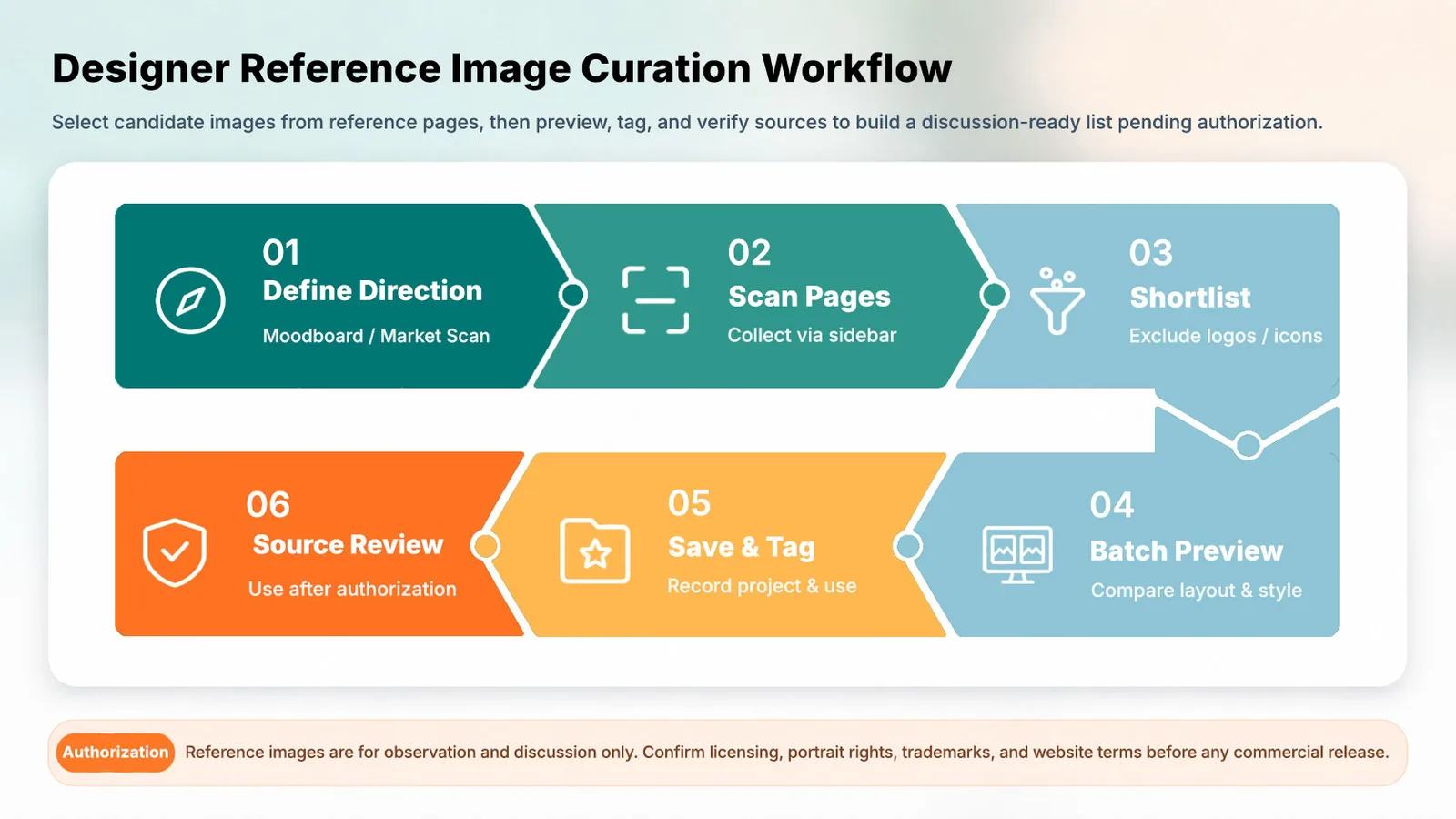
1. Define what this reference set needs to answer
Do not start saving images as soon as a webpage opens. Give yourself a clear question first, for example:
| Design task | What this reference set should help you judge |
|---|---|
| Brand visual refresh | Color, typography mood, photography direction, graphic language, and layout density |
| Website hero or campaign page | Hero composition, headline whitespace, button area, and how the product is shown |
| Product scene references | People, scenes, lighting, materials, background complexity, and usage context |
| Illustration or 3D style exploration | Form language, color layering, light and shadow, and detail density |
| Client review material | Which images are direction references only, and which ones need rights confirmation |
The clearer the direction, the faster the later filtering becomes. Otherwise, it is easy to save many images that “look nice” but cannot actually move into a proposal.
2. Capture candidate images from reference pages
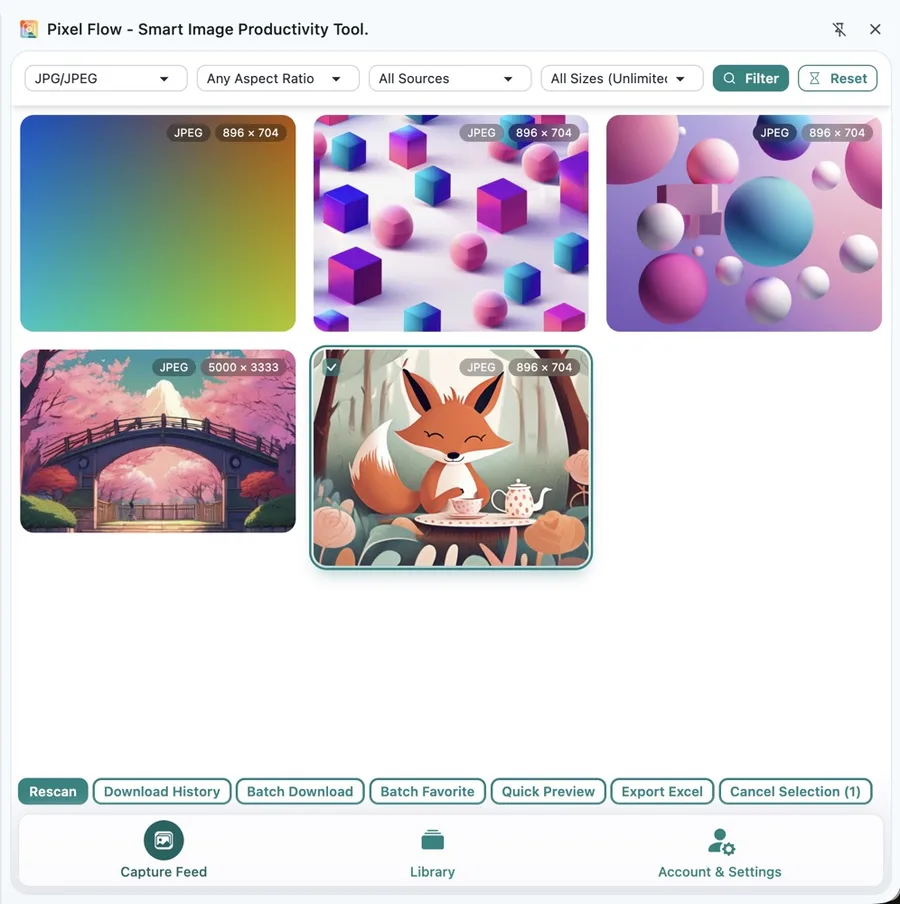
After opening a competitor page, portfolio page, campaign page, stock library, or campaign landing page, use Capture Page Images in Bulk to enter the capture flow. At this stage, do not rush to download. First review which images on the page are truly worth entering the candidate pool.
3. Remove noise before keeping candidates
Not every image detected on a webpage is a design reference. Exclude these first:
- Icons, avatars, marks, button backgrounds, rating stars, and payment badges.
- Tiny thumbnails, decorative fragments, loading placeholders, and repeated cropped images.
- Attractive images that do not match the current project direction.
- Images with unclear sources, incomplete context, or a high risk of being mistaken for deliverable assets.
Then keep candidates according to the current design task:
| Reference type | Suggested filtering | What to observe |
|---|---|---|
| Hero visuals | Prioritize large landscape images, remote links, and clear subjects | Composition focus, headline space, brand feel |
| Campaign banners and social visuals | Filter by landscape, portrait, or square ratios | Information hierarchy, crop-safe area, visual impact |
| Product or scene images | Keep larger images with clear subjects and clear source pages | Usage context, material expression, lighting, and background |
| Illustration and 3D styles | Start broad, then save by style language | Color, form, detail density, and series consistency |
| Client review references | Add project, purpose, and review-status tags after saving | Whether the image could be misunderstood as a final usable asset |
Keep “worth observing” and “allowed to use” as separate judgments. Competitor images, third-party works, and stock preview images can enter an observation list, but saving, exporting, or downloading them does not make them usable for commercial design.
4. Use Quick Preview for design judgment
Quick Preview is useful during the design judgment stage. You are not confirming every metadata field here. You are comparing candidates from the same set quickly: which composition is closer to the current direction, which image becomes unstable when enlarged, and which one only looks good as a thumbnail.
Focus on:
- Composition: subject position, whitespace, visual flow, and where a headline or button could sit.
- Color: main color, supporting color, contrast, and fit with brand tone.
- Material: photography, illustration, 3D, gradients, textures, or interface screenshot style.
- Information hierarchy: whether the image can support a hero area, card, cover, long image, or social crop.
- Consistency: whether the same set can form a series instead of being individually attractive but disconnected.
If you need to understand an individual image’s source, dimensions, auxiliary description, metadata, or operation record, open Image Details.
5. After saving, use tags to record project, purpose, and status
Saving is not the end. For a design team, the value of tags is not that the library “looks categorized.” It is that a few weeks later, everyone still knows why the image was kept.
Split tags into three groups:
| Tag type | What it records | Examples |
|---|---|---|
| Project or client | Which project, client, brand, or campaign the image belongs to | brand-refresh, website-redesign, spring-campaign, client-a |
| Purpose or placement | Which design judgment the image supports | hero-reference, moodboard, product-scene, social-cover, illustration-style |
| Review status | Whether the image can move forward | internal-reference-only, needs-license-check, client-provided, owned-asset, not-for-commercial-use |
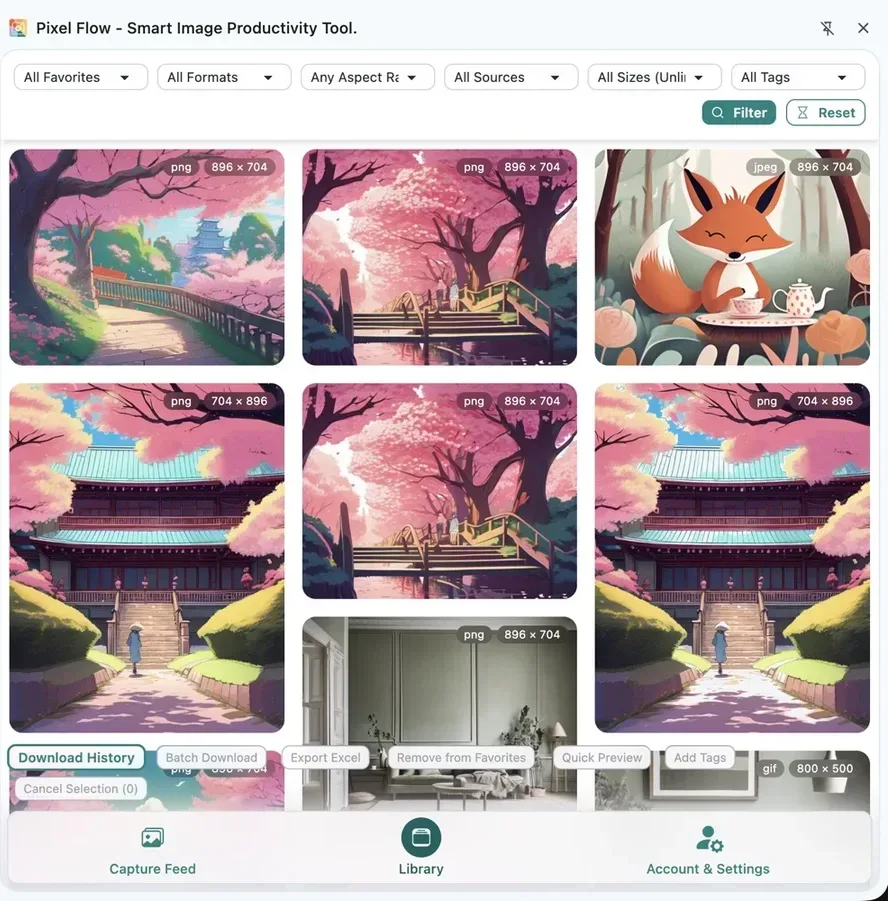
Use tag names the team can understand over time. Avoid vague labels such as nice, backup, or keep-for-now. For example, internal-reference-only is a stronger reminder than inspiration, and needs-license-check is better for handoff than maybe-usable.
6. Preserve source clues before review or handoff
When references are about to enter design review, client communication, or cross-team handoff, export an image inventory or keep source and rights clue records during download. This way, people see not only image files, but also source pages, image URLs, site information, dimensions, formats, and usage reminders.
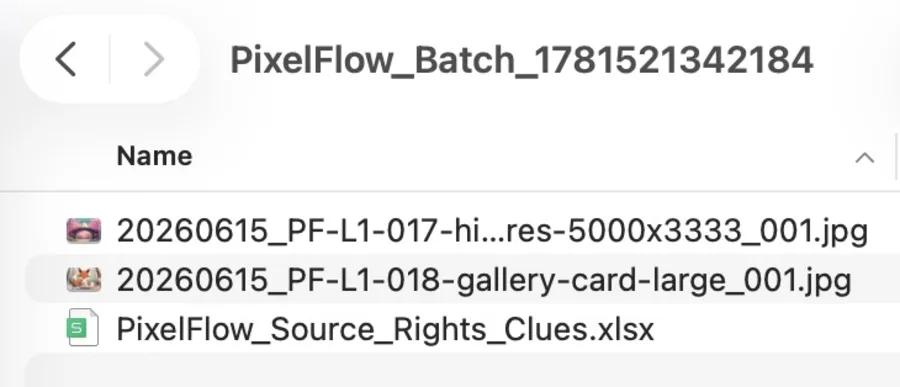
In review materials, you can explain each image like this:
| Question to answer | Suggested record |
|---|---|
| Why was this image kept? | Composition, color, style, placement, or mood direction |
| Where did it come from? | Source page, site name, image URL |
| Where might it be used? | Moodboard, hero reference, social direction, client discussion, internal library |
| Can it be used right now? | Internal reference only, needs license check, owned asset, not for commercial use |
| What is the next action? | Replace with owned image, contact for permission, redraw, reshoot, or keep as direction reference only |
How to Split Responsibilities During Design Review
Different roles do not look at the same reference set in the same way. You can use Pixel Flow’s image inventory as the discussion base, then ask each role to make its own judgment.
| Role | What they focus on | Result they should provide |
|---|---|---|
| Designer | Composition, color, style, detail density, series consistency | Keep, replace, or assign to a direction |
| Design lead | Whether it fits brand strategy and can support the final proposal | Move into proposal, exploration only, or wrong direction |
| Client or business stakeholder | Whether it matches brand feeling, campaign goals, and audience expectations | Approve direction, request changes, or add constraints |
| Content or operations | Whether it fits the channel, crop, and publishing scenario | Usable for discussion, needs placement changes, or needs another ratio |
| Reviewer | Source, license scope, portrait rights, trademarks, and website terms | Continue, request more material, or do not use |
Technical Standards Note
The following topics are technical. Every designer does not need to master them, but they explain why source, auxiliary description, metadata, and provenance information are worth preserving.
| Information type | Why it helps design references | Reference |
|---|---|---|
| Auxiliary description | It may explain what the webpage author intended an image to convey, but it cannot replace human judgment. The W3C WAI image accessibility tutorial also emphasizes that alternative text should express the meaning an image conveys, not mechanically describe its appearance. | W3C WAI Informative Images |
| Image metadata | IPTC explains that photo metadata is commonly used to record description, copyright, and licensing information, and also supports image retrieval and organization workflows. Readable metadata can serve as a review clue. | IPTC Photo Metadata |
| Content provenance | The C2PA specification focuses on provenance and authenticity claims for digital media. Even when provenance information exists, whether an image can be used still depends on project purpose and authorization material. | C2PA Specifications |
These details are clues, not authorization conclusions. After compression, transcoding, screenshots, social uploads, or content delivery network processing, metadata may be removed or rewritten. If no copyright field is found, that does not mean the image has no copyright.
Do Not Use It This Way
- Do not treat “visible on the web” as “commercially usable.”
- Do not treat “saved,” “downloaded,” or “exported to Excel” as “authorized.”
- Do not place competitor images, portfolio images, or stock previews directly into client-ready final work.
- Do not save images only because they look good without recording project, purpose, and review status.
- Do not treat source screenshots, image URLs, auxiliary descriptions, or metadata as license documents.
- Do not crop out watermarks, credits, or copyright information and continue using the image for public publishing.
What This Workflow Ultimately Leaves Behind
A healthy design reference curation workflow should not end with only an image folder. It should leave behind:
- A filtered set of candidate reference images.
- Source page, image URL, dimensions, format, and auxiliary description for each image.
- Project, purpose, and review-status tags.
- Direction notes used during design review.
- An exported image inventory or source and rights clue record.
- License documents, client confirmations, stock orders, or internal approval records when needed.
Weeks later, when you return to the project, you do not need to reconstruct clues from download filenames, chat records, and browser history. You can explain to the team why this reference set exists, how it should be used, and where the boundaries still are.
FAQ
Can competitor website images be placed in a moodboard?
They can be used as internal observation and discussion material, but do not assume they can be publicly shown, delivered to a client, or used commercially. Before showing them to a client, mark them clearly as “direction reference” or “needs license check” so they are not mistaken for final assets.
Does saving an image mean it can be used in a design file?
No. Saving only keeps the image and its source clues so the team can compare, discuss, and review it later. Whether it can enter a design file depends on the image’s license scope, project purpose, client requirements, portrait rights, trademarks, and website terms.
Can a reference image be used after cropping, recoloring, or collage editing?
Not necessarily. Secondary editing does not equal permission. Before public release, confirm the original license, whether adaptation is allowed, and whether people, trademarks, fonts, packaging, or other protected content are involved.
If reference images are already pasted into a design file, do I still need Pixel Flow?
If they are only temporary personal inspiration, maybe not. But once the set will be reviewed, revisited, handed off, or checked for rights, preserve source clues before it enters the design file. A design file answers “how to express it.” Pixel Flow answers workflow questions such as “where did this reference set come from, why was it kept, and how should it be reviewed later.”